
← Back to articles · Coin Dealer information ·
Google Merchant Center Feed for Coin and Bullion Dealers
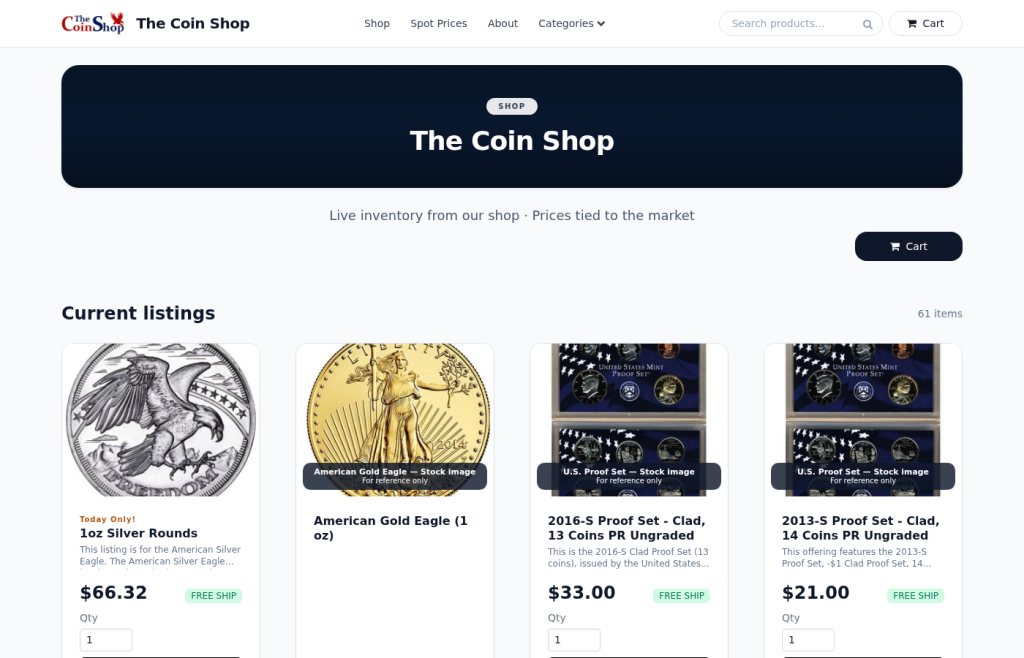
Updated August 2026. Google Merchant Center Feed for Coin and Bullion Dealers is not a spreadsheet problem — it is a live catalog problem. SpotPro ExtraCoins already emits a shopping feed you can schedule in Google Merchant Center and the same feed in Microsoft Merchant Center for Bing product ads. Thin “we research this keyword daily” pages do not get you free listings; a clean feed and honest Online Listings do.
One product feed for Google and Bing (Microsoft)
SpotPro already publishes your ExtraCoins catalog as a live shopping feed. You do not rebuild a spreadsheet every Monday. The same feed URL works for Google Merchant Center and Microsoft Merchant Center (Bing Shopping / product ads).
- Where to copy it: Company Profile → ExtraCoins store → Google Shopping feed — or Online Listings → Get found online
- Current path:
https://yourstore…/shopping-feed(legacy/shopping-XML-feed.phpstill exists) - Local floor stock:
/shopping-local-inventory-feedwith Google Business Profile for free local listings - Vacation mode: pauses advertising inventory when you are closed so ads do not sell stock you will not ship
- Hygiene: Visible + Buy online + in stock + photo + clear title — those rows are what the feed exports
Connect Google Merchant Center with a scheduled fetch on that URL. In Microsoft Merchant Center, create a catalog and point the same scheduled fetch at the same URL. Campaign bids live in Google Ads / Microsoft Advertising — the catalog work is shared because SpotPro owns the feed.
How ExtraCoins (included with SpotPro) supports this
- Branded shop on your ExtraCoins hostname — categories, search, product pages, spot charts
- Live bullion pricing in cart from Kitco spot (with backup) plus your POS premiums — not a static brochure
- Store Listings — online vs in-store-only flags so high-value coins can show without open cart risk
- $0 listing / selling fees from SpotPro — card processors and postage are separate dealer accounts
- Pickup queue + Ship Desk / Shippo — web orders without breaking the counter line
Setup checklist
- Verify ExtraCoins (or custom) domain in Google Merchant Center and Microsoft Merchant Center
- Add scheduled fetch → SpotPro
/shopping-feed - Confirm free listings / Shopping eligibility for your country
- Optional: link Google Ads / Microsoft Advertising for paid product campaigns
- Submit store sitemap in Search Console (discovery) — separate from the product feed
- Use vacation mode when closed; fix disapproved items in Online Listings, not in a side spreadsheet
Local SEO that works with SpotPro data
- Match Company Profile NAP (name, address, phone) to Google Business Profile exactly
- Point GBP website to your ExtraCoins store or custom domain on CoinWebHosting — not a dead Facebook tab
- Post holiday hours and buy/sell specials; keep them consistent with Display Screen / Live Buy Sheet
- Product discovery at scale still needs the shopping feed in Merchant Center — GBP alone is not a catalog
- Internal links from guides (this site) to live shop pages beat thin keyword stubs
What not to publish
- Do not ship keyword-only stubs with no workflow — they look thin and waste crawl budget
- Do not invent dealer counts, fake “highest prices,” or fees SpotPro does not charge
- Do not advertise items missing photos or paused in vacation mode
- Do not treat backlinks as a substitute for Merchant Center, GBP, and real inventory photos
Next steps
- Start a SpotPro trial (introductory pricing lock-in for life while continuously subscribed — cancel anytime; see spotpro.us for current offer)
- Turn on ExtraCoins Online Listings and copy the shopping feed for Google + Microsoft Merchant Center
- Align Company Profile NAP with Google Business Profile
- Read the related guides below — skip thin keyword pages that do not teach a real workflow
Related guides
- What is SpotPro?
- ExtraCoins storefront guide
- Google Shopping feed setup
- Bing ads + shopping feed for coin shops
- Merchant Center checklist
- Setup checklist for new dealers
- Articles index
Learn more at spotpro.us and extracoins.com. Product details always win over generic “marketing tips” pages — that is why this article shows the actual SpotPro paths.